


Quick Answer
An AI search visibility audit checks whether ChatGPT, Perplexity, and Google’s AI features can actually reach, understand, and cite your website. It covers four things: crawler access (can AI bots fetch your pages), content extractability (can they lift a clean answer from your structure), E-E-A-T and author-entity signals (do they trust the source), and third-party corroboration (what’s being said about you elsewhere on the web). Run through the six steps below in order — each one builds on the last — and you’ll end this article with a scored, prioritized list of exactly what to fix.
By Abhiram | Digital Marketing Specialist, 15+ Years in B2B Lead Generation & SEO
Why This Audit Matters Now
If your Google rankings dropped tomorrow, you’d know within a day — Search Console would show it. If ChatGPT quietly stopped citing your website, you might never find out. There’s no dashboard for that. No alert. Your traffic from AI platforms just… doesn’t happen, and you have no way of knowing whether that’s because your content isn’t good enough or because a bot got blocked by a firewall rule someone set up three years ago.
I’ve run this exact audit process on my own site and on client sites over the past several months, and the second scenario turns out to be far more common than people expect. I’ve found sites with genuinely strong, expert content that AI crawlers simply couldn’t reach — not because the content was weak, but because of a security setting nobody had revisited since before ChatGPT existed.
This guide walks through the same six-step process I use, in order, with the exact commands and checks so you can run it yourself without any paid tools. By the end, you’ll have a clear, prioritized list of what’s actually blocking your AI visibility.
Table of Contents
What an AI Visibility Audit Actually Measures
A traditional SEO audit checks rankings, backlinks, and page speed. An AI visibility audit checks something different: whether a language model’s internal representation of your site matches reality, and whether it’s mechanically able to retrieve and cite you at all. That splits into two connected disciplines — AEO (Answer Engine Optimization: can AI systems extract a clean answer from your content) and GEO (Generative Engine Optimization: does your content have the depth and authority signals AI systems look for when choosing a source).
Everything in this audit falls into one of four domains:
- Access — Can AI crawlers technically reach your pages?
- Extractability — Can they pull a self-contained, citable answer from your structure?
- Authority / E-E-A-T — Does the system trust you as a source?
- Third-party corroboration — What does the rest of the web say about you?
You’ll audit each domain in order, because they’re sequential — there’s no point optimizing your content structure (Domain 2) if a crawler can’t reach the page at all (Domain 1).
Before You Start: Build a “Money Prompt” List
Keyword research doesn’t map cleanly onto AI search — people don’t type fragments into ChatGPT, they ask full questions. Before you audit anything, write down 10-15 real questions your buyers would ask an AI assistant, mapped to where they are in the buying journey. This list is what you’ll test against in every step below.
| Funnel Stage | Example Prompt |
|---|---|
| Awareness | “What is [your category] and why does it matter?” |
| Consideration | “What’s the best [your category] for [use case]?” |
| Comparison | “[Your brand] vs [Competitor] — which is better?” |
| Decision | “Is [your brand] worth it?” |
| Post-purchase | “How do I get the most out of [your product/service]?” |
Keep this list somewhere you’ll reuse it — you’ll run these same prompts every time you re-audit, so you can track whether your visibility is improving.
Step 1: Audit Crawler Access (The Technical Foundation)
This is the step people skip and the one that causes the most damage. If a bot can’t reach your page, nothing else in this guide matters.
Check your robots.txt for each AI crawler. Visit yoursite.com/robots.txt in a browser and manually scan for a User-agent: block for each of these:
GPTBot,OAI-SearchBot,ChatGPT-User(OpenAI)ClaudeBot,Claude-SearchBot,Claude-User(Anthropic)PerplexityBot(Perplexity)Google-Extended(Google’s AI training/features)CCBot(Common Crawl — trains many third-party models)
For each one, check whether it’s sitting under a Disallow: / rule. A common, well-reasoned setup blocks pure training crawlers while allowing retrieval/citation crawlers — because those are two different things. Training crawlers (GPTBot, CCBot, Google-Extended) feed a model’s long-term training data. Retrieval crawlers (OAI-SearchBot, ChatGPT-User, PerplexityBot, Claude-SearchBot) fetch your page in real time to answer a specific user query and cite you as the source. Blocking the second group means you disappear from AI answers entirely, no matter how good your content is.
A reasonable robots.txt block looks like this:
User-agent: OAI-SearchBot
Allow: /

User-agent: ChatGPT-User
Allow: /

User-agent: PerplexityBot
Allow: /

User-agent: ClaudeBot
Allow: /

User-agent: GPTBot
Disallow: /

Sitemap: https://yoursite.com/sitemap.xml
Test actual server-level access, not just the rules file. robots.txt is a set of instructions bots are supposed to respect — it doesn’t prove they can physically reach you. A surprising number of sites block AI crawlers at the CDN or firewall level (Cloudflare, Sucuri, a WAF) without realizing it, because those systems often lump unfamiliar bots in with malicious scrapers by default. Run this from a terminal for each crawler:
curl -A "GPTBot" -I https://yoursite.com/
curl -A "PerplexityBot" -I https://yoursite.com/
curl -A "ClaudeBot" -I https://yoursite.com/
A 200 OK means the server let the request through. A 403 Forbidden means something is blocking that crawler before it ever reaches your robots.txt rules — check your CDN or security plugin’s bot-management settings next.
Check for an llms.txt file. This is a newer, simpler file (unrelated to robots.txt) that gives AI systems a clean, curated map of your most important content — similar in spirit to a sitemap, but written for language models instead of search engines. Most sites don’t have one yet: recent analysis found roughly 88% of websites are missing it entirely. If your site is small to mid-sized, start with a standard llms.txt. If you’re running a large content library, consider llms-full.txt instead:
| Feature | llms.txt | llms-full.txt |
|---|---|---|
| Primary purpose | Navigation and structure | Complete content |
| Content included | Summary and links | Full documentation |
| Size | Small (typically under 10KB) | Large (can be multiple MB) |
| Implementation complexity | Simple | More complex |
| Best for | Quick orientation | In-depth assistance |
| Format | Structured markdown | Consolidated markdown |
Place either file at yoursite.com/llms.txt, written in plain markdown with clear headings and links to your most authoritative pages. Source: llmstextgenerate
Check whether your content depends on JavaScript rendering. Many AI crawlers fetch raw HTML and don’t execute JavaScript the way a browser does. If your key content only appears after a script runs client-side, some AI systems simply never see it. View your page’s source (not the rendered DOM) and confirm your core text is actually present in the raw HTML.
If you’d rather not do this manually across dozens of pages, free bulk checkers exist that test robots.txt, llms.txt, and crawler access across an entire site in one pass — worth using once you’ve confirmed the manual process works on your homepage.
Step 2: Manual Citation Testing Across Platforms
Once you know bots can reach you, find out whether they’re actually citing you. Take your money-prompt list from earlier and run each prompt on every major platform, logging the results.
Platforms behave differently, so test each one on its own terms:
- ChatGPT — Results vary depending on whether search/browsing mode is active, and citation behavior is genuinely inconsistent from query to query: sometimes you’ll see inline links, sometimes footnotes, sometimes no sources at all. Run each prompt more than once before concluding you’re not cited.
- Perplexity — Always shows a visible sources panel and retrieves from the live web by default, which makes it the easiest platform to audit cleanly. If you want a fast read on where you stand, start here.
- Google AI Overviews / AI Mode — Check whether an Overview appears at all for your prompt, and whether your domain is among the cited sources.
- Claude, Copilot, Gemini — Worth a lighter pass; behavior and citation rates vary by platform, but the same self-contained, well-structured content tends to perform consistently across all of them.
Log everything in a simple table you can reuse every quarter:
| Prompt | Platform | Cited? (Y/N) | Position | Notes |
|---|---|---|---|---|
| “What’s the best CRM for small teams?” | Perplexity | Y | 2nd source | Cited for pricing comparison |
| “What’s the best CRM for small teams?” | ChatGPT | N | — | No sources shown this run |
Step 3: Audit Content Extractability & Structure
Access gets you in the door. Structure decides whether the AI can actually use what it finds.
Run the self-contained passage test. Pick a paragraph from your page and read it in isolation, as if it were the only text the AI had access to. Does it fully answer a specific question on its own, or does it depend on context from earlier paragraphs? AI systems extract passages, not entire pages — a paragraph that only makes sense in sequence is much less likely to get lifted cleanly.
Lead with the answer. Structure each section so the direct answer comes in the first sentence or two, with supporting detail after. This is the single biggest structural lever you have.
Use real heading hierarchy and scannable formatting. Clear H2/H3 headings, short paragraphs, numbered steps for processes, and tables for anything comparative — all of this makes your content easier for both AI systems and human readers to parse.
Audit your structured data. Check which schema types are implemented on your key pages:
- Article schema on blog content
- FAQPage schema on any FAQ section (including this one)
- HowTo schema on step-by-step guides
- Organization schema on your homepage
- Product schema on anything you sell
Each one gives AI systems an explicit, machine-readable signal about what a page is and how to interpret it — worth implementing even if your CMS makes it a five-minute job through a plugin.
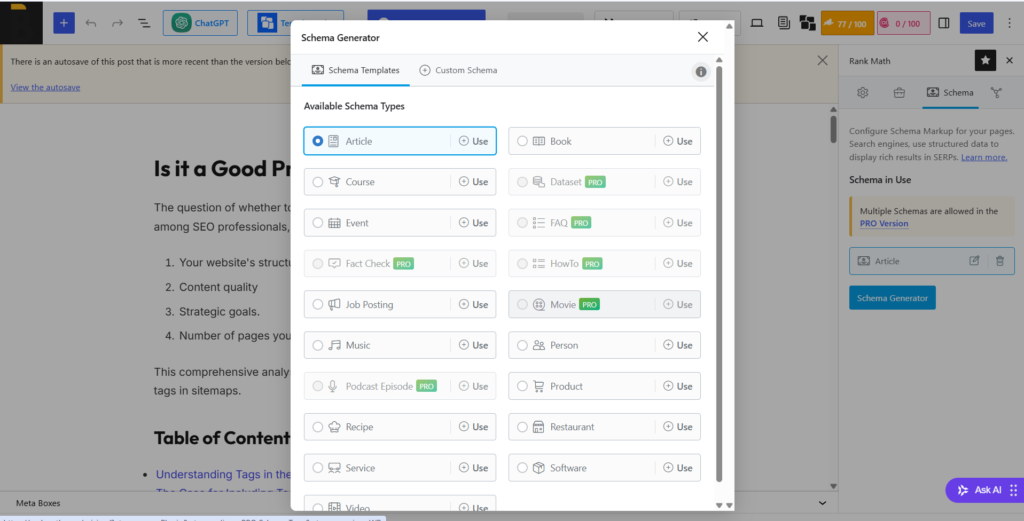
If you are using Rankmath plugin, you can change the schema of the page or article or any as shown in the image above. Having a relevant schema can give high chances of ranking in the AI search results.
Step 4: Audit Your E-E-A-T & Author-Entity Signals
This is the domain that’s changed the most heading into 2026, and it’s the one most technical audits skip entirely.
Google’s March 2026 core update re-weighted rankings around three overlapping signals:
- Information gain (does your content add something that doesn’t already exist elsewhere),
- Author expertise (can the person behind the content be verified as a real, credentialed expert),
- Topical coherence (has the domain built consistent authority in a specific area, rather than publishing shallowly across many topics).
AI Overviews and answer engines pull from the same trust signals when deciding who to cite.
The mechanism behind this is worth understanding: when your content includes structured author information, AI systems don’t just take your word for who wrote it. They check whether the author named in your schema is verifiably the same person elsewhere on the open web — LinkedIn, industry publications, professional profiles. That cross-referencing is what turns a byline into a trust signal instead of just a name.
Run through this checklist on your key pages:
- Does every article have a real, named author — not “Admin” or no byline at all?
- Is there a dedicated author page with a professional bio, credentials, and a list of what they’ve published?
- Does your Person schema include
sameAslinks pointing to that author’s LinkedIn and other verifiable profiles? - Is the byline consistent across every piece — same name, same author page, every time?
- Does the content include genuine first-hand experience (real examples, original data, a process you’ve actually run) rather than just a synthesis of what’s already published elsewhere?
If you’re publishing under generic or anonymous bylines right now, this is very likely your highest-leverage fix — and one competitors with strong content but weak author infrastructure often haven’t made yet.
Step 5: Audit Third-Party Corroboration
Here’s something most audits gloss over: when your own site doesn’t have deep authority on a topic, AI systems don’t just skip the citation — they pull from somewhere else. Usually that’s Reddit threads, Wikipedia, review aggregators like G2 or Capterra, or industry press.
Run your money prompts with a slight variation — ask directly what people say about your brand or product — and pay attention to which third-party domains show up repeatedly in the sources. That’s a frequency table worth building: if the same handful of external sites keep shaping how AI systems describe you, you have two options: get a presence on those sites, or build your own content deep enough to become the preferred source instead. One relevant, high-trust third-party mention can outweigh a dozen pages on your own domain that AI systems don’t yet trust as much.
Step 6: Fact-Check What AI Is Already Saying About You
This step catches something no traditional SEO audit checks for at all: is the AI’s existing picture of your brand actually accurate?
Ask ChatGPT and Perplexity direct questions about your company, pricing, and offerings, and check specifically for:
- Outdated facts — old pricing, a discontinued product still described as current, incorrect founding details
- Omissions — your newest offering not mentioned at all because it postdates the model’s training or hasn’t been picked up yet
- Sentiment drift — ask “what are common complaints about [brand]?” and check whether the answer reflects something outdated or already resolved, rather than your current reality
Treat this as more than an SEO nuisance. If an AI system is confidently stating incorrect pricing or outdated claims to a prospective customer doing due diligence, that’s a trust and, in some cases, a legal exposure issue — worth checking on a recurring basis, not just once.
Turn the Audit Into a Prioritized Fix List
Most guides stop at “here’s how to check.” The value is in what you do with the findings. Score each domain from your audit (1-5, where 5 means fully optimized) and sort fixes by effort:
| Fix | Domain | Effort | Priority |
|---|---|---|---|
| Unblock retrieval bots in robots.txt / WAF | Access | Hours | Do first |
| Publish llms.txt | Access | Hours | Do first |
| Add FAQ/Article schema to key pages | Extractability | Days | Quick win |
| Rewrite intros to lead with the answer | Extractability | Days-weeks | Quick win |
| Build dedicated author pages + Person schema | E-E-A-T | Weeks | Structural |
| Earn third-party mentions/reviews | Corroboration | Weeks-months | Structural |
| Correct hallucinated facts (via updated, citable pages) | Trust | Ongoing | Structural |
Technical access issues are nearly always the fastest fix and the highest-impact one — there’s no reason to invest in content or authority work before confirming AI systems can actually reach what you’ve already built.
How Often to Re-Audit
Run the full six-step process quarterly. Between full audits, it’s worth periodically re-checking your robots.txt and llms.txt after any platform migration, CMS update, or CDN/security change — a single accidental rule change can quietly cut off AI visibility for months without any obvious symptom on your end.
AI Visibility Audit vs. Traditional SEO Audit
| Traditional SEO Audit | AI Visibility Audit | |
|---|---|---|
| Primary question | Where do I rank? | Am I cited in the answer? |
| Measured via | Search Console, rank trackers | Manual prompt testing, log analysis |
| Core unit | Keywords | Prompts / questions |
| Success metric | Position, organic clicks | Citation frequency, share of voice |
| Trust signal | Backlinks, domain authority | Author-entity verification, third-party corroboration |
| Access check | Crawlability, sitemap | robots.txt for AI bots, llms.txt, JS-rendering |
The two disciplines overlap heavily and reinforce each other — this isn’t a replacement for SEO fundamentals, it’s an additional layer on top of them.
Key Takeaways
- You can’t see AI citation performance the way you see Google rankings — this audit is how you replace that missing visibility.
- Access problems (blocked crawlers, missing llms.txt, JS-only content) are the most common and the fastest to fix — check these first.
- Winning a citation depends on self-contained, answer-first content structure as much as on topic depth.
- E-E-A-T and author-entity verification carry more weight after the March 2026 core update — anonymous or inconsistent bylines are a real liability now.
- What third parties say about you matters as much as what your own site says, when your own authority on a topic is thin.
- Re-run this audit quarterly, and spot-check your robots.txt/llms.txt after any technical change.
Frequently Asked Questions
What’s the difference between an AI visibility audit and an SEO audit?
A traditional SEO audit measures where you rank on Google. An AI visibility audit measures whether AI systems like ChatGPT and Perplexity can access, extract, and cite your content directly inside their answers — a different (though related) mechanism.
How do I check if ChatGPT can crawl my website?
Check your robots.txt for a User-agent: OAI-SearchBot or ChatGPT-User block and confirm it isn’t disallowed. Then run curl -A "GPTBot" -I https://yoursite.com/ from a terminal — a 200 response means the server itself isn’t blocking the crawler.
What is llms.txt and do I need one?
llms.txt is a markdown file at your site’s root that gives AI systems a curated map of your most important content, similar in purpose to a sitemap but written for language models. Most sites don’t have one yet, and it’s a low-effort addition worth making.
Why isn’t my top-ranking Google page showing up in AI Overviews?
Ranking well organically doesn’t guarantee an AI Overview citation — research shows a meaningful share of AI-cited pages don’t rank in the top of organic search at all. Extractability and author-entity trust signals matter separately from your organic ranking.
Can I block AI training crawlers without losing AI search visibility?
Yes. Training crawlers (like GPTBot and CCBot) and retrieval/citation crawlers (like OAI-SearchBot, PerplexityBot, and Claude-SearchBot) are different bots. You can disallow the training crawlers while explicitly allowing the retrieval crawlers your citations depend on.
How often should I run this audit?
Quarterly for the full six-step process, with a lighter check on your robots.txt and llms.txt any time you migrate platforms, change your CDN, or update your security settings.
Want This Done for You?
Running this audit properly takes real time — testing across five platforms, checking server-level access, reviewing your schema and author infrastructure, and turning all of it into a prioritized plan. If you’d rather have it done right the first time, I offer a paid AI search visibility audit: a full six-domain review of your site, a scored report, and a prioritized action plan you can hand straight to your dev or content team.
Request Your Paid AI Search Visibility Audit → or Email abhiram@bhuzz.com
Abhiram is a digital marketing specialist with over 15 years of experience in B2B lead generation, SEO, and 360-degree digital marketing execution. He writes about real-world marketing strategy at Bhuzz.com.
